

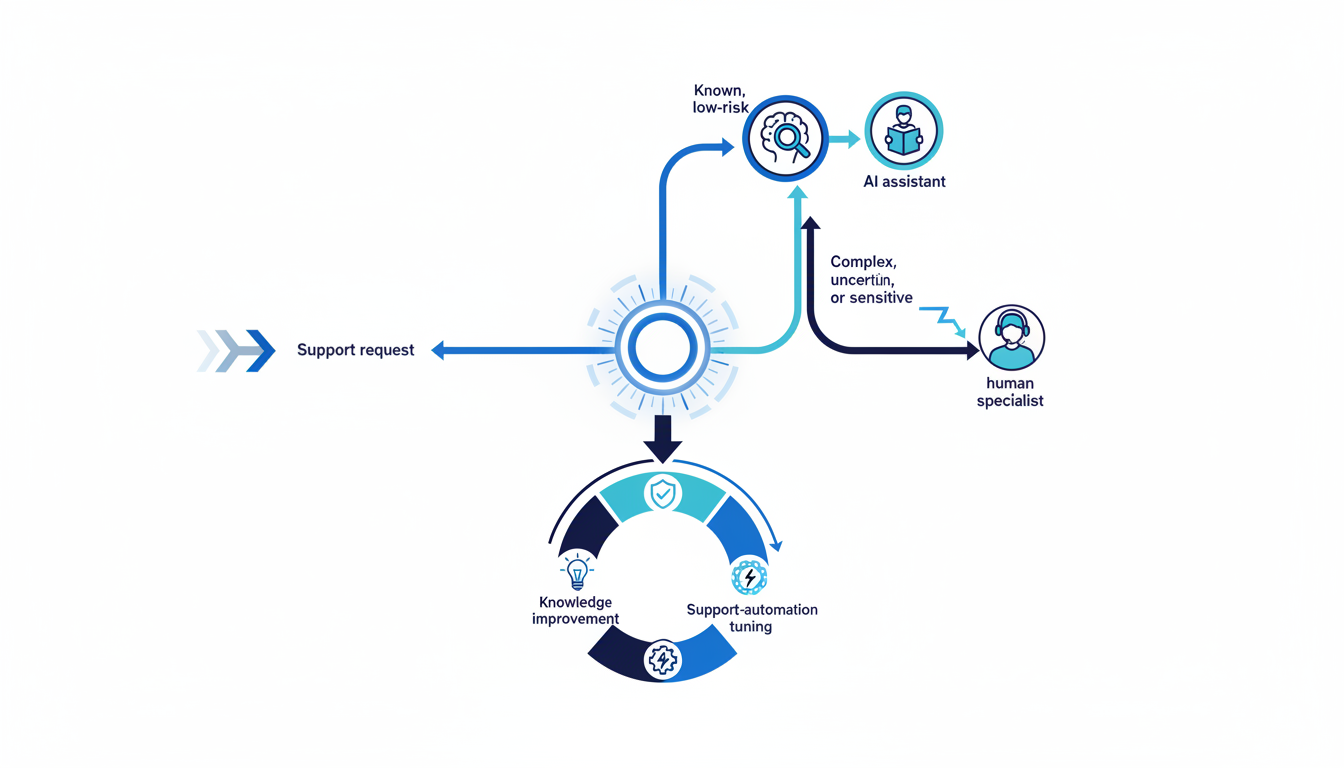
A strong customer support team structure routes each request to the right level of help, gives one person clear ownership, and feeds what the team learns back into knowledge, product, and service operations. Build around the mix of customer issues and the risk of a wrong answer—not a generic ticket-per-agent ratio.
The design below separates customer-facing resolution from the operating work that keeps the service consistent. It also shows how to add AI-assisted handling without leaving answer quality, escalation, or staffing without an owner.

Map demand before dividing the team into tiers
Start by classifying the work customers bring to Support. Count volume by issue type, but also record complexity, channel, time sensitivity, product area, repeat contacts, and whether the answer is already documented. A hundred password questions and a hundred data-loss reports are not the same staffing problem.
A useful intake map distinguishes four kinds of work: known questions with a verified answer; common issues that need diagnosis; technical problems requiring product expertise; and sensitive, high-impact, or incident-related cases. That map tells you where self-service or automation can help and where a person needs to own the next action.
| Request class | Default route | Escalate when… |
|---|---|---|
| Known, low-risk, documented question | Knowledge article, guided self-service, or bounded AI response. | The customer’s context does not match the documented answer or confidence is low. |
| Routine issue with a known troubleshooting path | Frontline agent follows a playbook and records the outcome. | The steps fail, a repeat contact appears, or the issue affects a critical workflow. |
| Complex product, integration, or account configuration | Specialist or technical support works the case with the original owner. | A defect, security concern, outage, or cross-team dependency is confirmed. |
| Sensitive, urgent, or potentially harmful consequence | Human triage with a named case owner and clear customer update cadence. | Use the organization’s incident, security, billing, or compliance path where applicable. |
An escalation should preserve ownership. A specialist may investigate while the frontline owner remains responsible for the customer update, unless the case is explicitly transferred and accepted. This small rule prevents customers from repeating the story and agents from treating transfer as resolution.
Use a small set of roles before building a large org chart
Early teams can combine roles. As issue volume and product complexity grow, separate responsibilities when recurring work prevents the team from resolving cases well.
| Role or capability | What it owns | When to separate it |
|---|---|---|
| Frontline support | Intake, known troubleshooting, customer updates, and case ownership. | Separate generalist and specialist queues when skill mismatch or transfers repeatedly delay resolution. |
| Product or technical support | Advanced diagnosis, integrations, reproducibility, and technical workarounds. | Add dedicated technical coverage when the same product expertise is needed across recurring cases. |
| Support operations | Routing, staffing plans, tools, knowledge workflows, training, and service quality. | Give it explicit ownership when managers cannot maintain the system while handling daily queues. |
| Quality and coaching | Conversation review, calibration, feedback, and learning needs. | Create a dedicated owner when review quality and agent development become inconsistent. |
| Automation and AI operations | Approved use cases, source content, test cases, escalation behavior, and ongoing review. | Assign an owner as soon as automation handles customer-facing work; this may begin as part of Support Ops. |
Zendesk’s guide to support operations describes functions such as workforce planning, systems, training, quality, and workflow coordination. Intercom offers a current company example that separates Human Support, AI Support, and Support Operations and Optimization. These are useful role-design references, not a mandatory three-department org chart.
Design the path between automation and human help
Automation belongs where the request is bounded, the source of truth is current, and the failure cost is acceptable. A human should take over when the case is ambiguous, the answer is unsupported, the customer has already tried the same step, or the issue touches security, billing, access, a product incident, or a high-consequence business workflow.
If AI handles conversations, assign a named owner for each part of the system: approved knowledge, test scenarios, routing rules, human handoff, quality review, and performance reporting. Intercom’s discussion of emerging customer-service roles highlights enablement, AI quality review, and workforce planning as the work changes. It is an example of how responsibilities can shift; the right setup depends on your service volume and product risk.
A quality review should include more than whether the system generated an answer. Sample whether the answer was supported, whether it solved the customer’s request, whether the customer needed to repeat themselves, and whether the escalation reached a person with enough context. Keep a reliable human path visible in the service design.
Separate Support, Customer Success, Product, and Engineering
Support resolves incoming issues and communicates progress. Customer Success helps customers adopt the product and reach the outcomes that matter to them. Product sets product direction; Engineering investigates and fixes defects. These teams need shared signals, but a shared customer does not mean shared accountability for every task.
| Event | Support owns | Partner owns |
|---|---|---|
| How-to question or account issue | Resolve or route the request, preserve case ownership, record the cause. | Knowledge owner updates guidance if the answer was missing or misleading. |
| Adoption is behind the customer’s goal | Provide issue and usage context when a support barrier is involved. | Customer Success owns the outcome plan and follow-through. |
| Repeatable defect or service incident | Give the customer clear updates, maintain the incident case, and surface impact. | Engineering investigates the defect; Product or incident leadership coordinates the broader response. |
| Repeated friction across many customers | Tag and quantify the pattern in a form teams can inspect. | Product prioritizes changes; Support Ops checks whether routing or documentation also needs revision. |
Use knowledge-base governance to keep answers current, and review community health and escalation load when customers help one another. For product incidents, the customer incident recovery guide can help coordinate updates across teams.
Staff for workload and coverage, not just ticket count
Estimate workload using issue volume by type, handling effort, follow-up and reopened cases, channel coverage, and the time required for training, quality review, knowledge work, and incident readiness. Then compare that work with the hours the team can actually spend resolving cases. Do not treat all scheduled time as customer-facing capacity.
Before hiring, test the cause of rising backlog. It may be an uneven schedule, a new issue category, a broken routing rule, poor documentation, a release-related incident, or an increase in complex conversations. Fixing the constraint may call for a schedule change, a product escalation path, or an operations owner instead of another generalist.
| Signal | Inspect before hiring |
|---|---|
| Response delays are increasing. | Check coverage by hour and channel, demand spikes, routing, and unassigned cases. |
| Cases move between agents or teams repeatedly. | Review issue taxonomy, permissions, skill routing, and handoff context. |
| The same problem generates repeat contacts. | Inspect resolution quality, product defects, instructions, and reopen reasons. |
| Agents have no time for coaching or knowledge maintenance. | Separate delivery work from training and system upkeep; calculate the actual non-case workload. |
| AI resolves more requests but customers return with the same issue. | Compare automated resolutions with repeat contact, human escalation, answer support, and customer feedback. |
Balance speed, quality, and customer effort
Use a scorecard that shows flow and resolution quality together. Response and resolution times show access and speed, but they do not tell you whether the issue was solved. Pair them with first-contact resolution or repeat contact, reopen rate, transfers, customer effort or satisfaction by issue type, and quality review findings.
For AI-assisted service, report automated resolution alongside escalation, correction, repeat contact, and sampled answer quality. A rising automation rate is useful only if customers still get accurate answers and can reach a person when needed. Avoid a single speed target that rewards premature closure.
Roll the structure out in controlled steps
- Document the top issue types, customer impact, existing sources of truth, and current owners.
- Create a simple route for known questions, frontline diagnosis, specialist work, and urgent or sensitive issues.
- Assign an owner for support operations and knowledge, even if the responsibility is initially part-time.
- Pilot one routing or automation change with a clear boundary and a human escalation path.
- Review the scorecard and customer feedback before expanding to other issue types or channels.
A customer support team should become easier to navigate as it grows. If the team cannot tell what was promised before the customer reached Support, connect the service pattern to onboarding and CRM context. Scale Orbit can discuss the measurement and handoff side of that problem through its contact page.
Further reading
- Support Operations: An Introductory Guide for 2026 — Zendesk.
- The Customer Service Roles AI Needs to Succeed — Intercom.
How did this article land?
Choose one reaction. You can change it anytime.