

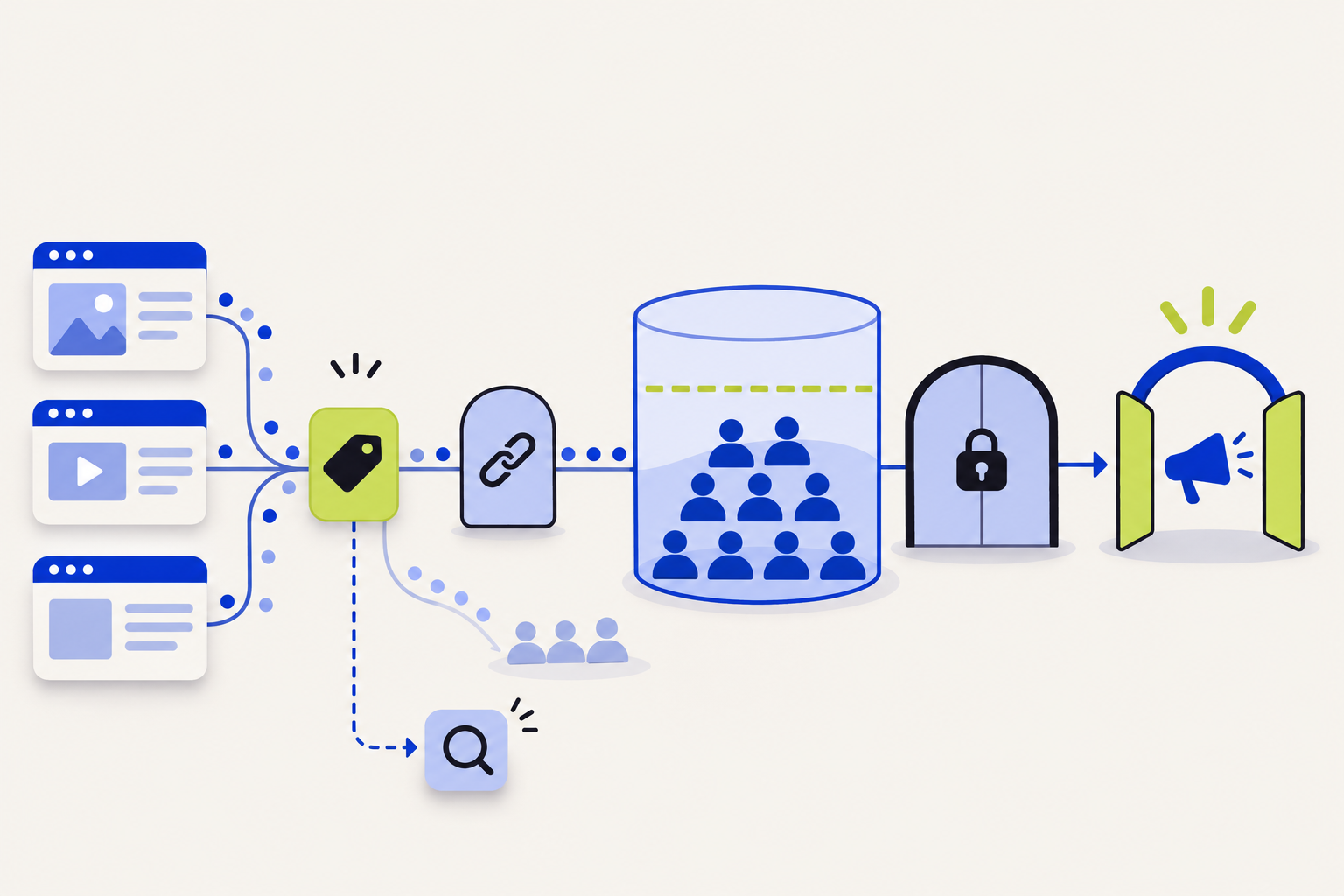
A LinkedIn website retargeting audience can show “No signal,” remain “Building,” or stay below the size needed to deliver an ad set. Those statuses describe different checkpoints. The Insight Tag has to send a signal from the pages you want to include; the URL rules have to match those pages; LinkedIn must match some visitors to member accounts; and the resulting audience must reach the minimum size for delivery.

Start with the status: “No signal” points to tag coverage or audience setup; “Building” under 300 means the segment has not yet reached LinkedIn’s minimum; “Sending signal” means a website signal is being received but does not by itself guarantee the audience is large enough to target. Raw website sessions and matched LinkedIn member accounts are different counts.
Separate the Insight Tag status from the audience status
Campaign Manager reports tag or source status separately from a website audience’s signal and size. LinkedIn says an Insight Tag source marked Unverified means it has not received a signal; after a page visit, status may take up to 24 hours to change to Active. A website audience can also show No signal, Building, or Sending signal. A verified tag does not prove that a particular audience’s URL rule is correct or that it has reached delivery size.
| Status or symptom | What it suggests | First check |
|---|---|---|
| Insight Tag: Unverified | LinkedIn has not received a tag signal yet. | Load a page where the tag is installed; confirm the full tag and approved consent behavior, then allow up to 24 hours for status processing. |
| Website audience: No signal | The audience has not received a matching visit signal. | Confirm the segment exists, the tag is on the intended pages, and the URL rules match the actual pages. |
| Website audience: Building below 300 | Some signal may be arriving, but the matched member audience is still small. | Check tag coverage and URL rules, then allow more eligible LinkedIn members to visit. |
| Website audience: Sending signal | LinkedIn is receiving audience signals. | Check matched audience size separately; a signal status alone does not mean the ad set can deliver. |
LinkedIn’s Matched Audiences troubleshooting guide recommends checking tag placement, audience setup, and URL rules when the segment shows No signal or remains under 300.
Why website visits do not equal matched members
Website retargeting matches visitors to LinkedIn member accounts. LinkedIn notes that not every visitor can be matched to a known member account, so the audience can be much smaller than the website’s total sessions or unique visitors. A traffic report showing thousands of visits does not guarantee that the matched audience will contain the same number of people.
LinkedIn requires at least 300 matched member accounts for a website retargeting ad set to start delivering. Location is a required targeting facet, and LinkedIn advises that a Matched Audience used with location targeting should match more than 300 accounts because location can reduce the eligible audience further. The number shown in web analytics is not a substitute for Campaign Manager’s matched size.
Audience size also depends on the retention window selected for the segment. LinkedIn’s website-audience data guide describes a window between 30 and 180 days; members whose last qualifying visit is older than the selected period are removed on a rolling basis. If an audience shrinks after being active, compare its retention window with the actual volume and recency of visits to the pages in that segment.
If the audience shows No signal, check the exact page path
- Confirm that the website audience segment was created and is active in the correct ad account.
- Open each page that should qualify and verify the Insight Tag is installed there—not only on a different section or subdomain of the site.
- Compare the audience’s URL rule with the actual page URL after redirects. Check the hostname and path the browser ends up on, not only the link used in an ad or menu.
- Review tag-manager triggers, consent settings, content-security rules, or script delays that could keep the tag from firing on that page.
- After a real visit to an intended page, allow the status time to update. LinkedIn advises allowing up to 24 hours for the website audience to verify.
A tag may be present on the homepage while the target audience is built from a product, pricing, or campaign path that is not covered by the tag or URL rule. Check coverage at the page level. If your site uses multiple domains or subdomains, confirm that the retargeting setup accounts for the exact pages the audience should contain.
For tag-installation issues, see LinkedIn’s Troubleshoot the LinkedIn Insight Tag guide. For audience-status steps in Campaign Manager, see Check the status of your website audience.
If the audience is building but stays below 300
If the status is Building and the size is below 300, that can be a volume or match-rate constraint rather than a broken tag. First confirm that the tag covers all intended pages and that the URL rule includes the pages whose visitors you want to retarget. Then check whether enough LinkedIn member accounts have visited those pages inside the audience’s retention window.
Do not solve a small audience by broadening the rule to unrelated pages without checking whether those visitors fit the campaign. A larger segment that includes visitors with different intent can make the campaign less useful. Consider whether a broader but still meaningful page group, a longer supported retention window, or a different campaign audience is appropriate for the objective.
If the matched audience exceeds 300 but an ad set still cannot launch or serve, review location targeting and the remaining campaign targeting criteria. Each additional restriction can reduce the eligible group. LinkedIn’s troubleshooting guide notes the required minimum and the effect of location filtering.
Keep the audience rule and the campaign purpose aligned
A website audience should be defined around a meaningful next message. Visitors to a pricing page, a product-use page, and a careers page may all have different intent. Use page rules that reflect the audience the campaign is meant to reach, and exclude paths that do not belong in that message when the setup allows it.
Review the rule whenever site paths change. A redesigned URL, redirect, removed page, or campaign landing-page migration can leave an old audience rule pointing to a path that no longer receives traffic. Recheck the segment after site releases, then confirm that the tag and URL rule still match live pages.
LinkedIn says the Insight Tag should not be installed on pages that collect or contain sensitive data, because doing so can inadvertently share information about visitors to those pages. Exclude sensitive account, transaction, health, or similarly restricted pages according to LinkedIn’s terms and your approved consent setup. Do not bypass a user’s consent choice to grow the audience.
A controlled retargeting-audience check
Use one intended page and one known browser session to trace the signal end to end. Note the live URL, the tag status, the audience’s URL rule, the audience status, the matched member count, the retention window, and the campaign’s location and targeting filters. Change one setting at a time so the next status change has a clear cause.
- If the tag remains Unverified, inspect tag placement and whether the intended page sent a signal.
- If the tag is Active but the audience says No signal, inspect the segment and its URL rule.
- If the audience is Building below 300, separate traffic volume from LinkedIn member matching and wait for more eligible visits.
- If the audience sends signal but cannot deliver, check matched size after location and other campaign filters.
- If the audience falls over time, review the retention window and whether the qualifying pages continue receiving relevant visits.
Our separate LinkedIn Insight Tag QA guide covers website conversion signals, duplicate events, and downstream conversion validation. This guide focuses on website retargeting audience construction and delivery readiness.
LinkedIn website retargeting checklist
- The Insight Tag is installed on every page intended for the segment and is not on sensitive-data pages.
- The website audience exists in the correct Campaign Manager ad account.
- The URL rule matches the live page path after redirects.
- Tag status, audience signal status, and matched audience size are reviewed as separate checks.
- The segment has at least 300 matched member accounts; location and other targeting filters do not reduce it below the usable threshold.
- The retention window fits the campaign’s recency requirement and actual page traffic.
- Consent and tag-manager behavior follow the website’s approved measurement settings.
If a retargeting audience cannot be built around a useful buyer journey, a free Revenue Diagnostic can help map the page path, campaign message, and CRM outcome before the campaign is expanded.
Sources and scope
- LinkedIn Marketing Solutions Help: Troubleshoot LinkedIn Matched Audiences — website audience “Building,” “No signal,” tag coverage, URL rules, and size requirements.
- LinkedIn Help: Check the status of your website audience in Campaign Manager — audience verification and status review.
- LinkedIn Marketing Solutions Help: Data collection and storage for LinkedIn Matched Audiences — audience matching and retention windows.
- LinkedIn Help: Troubleshoot the LinkedIn Insight Tag — Unverified tag status and signal troubleshooting.
LinkedIn Campaign Manager status labels, audience processing, and targeting availability can change. Confirm the current account’s status and live URL rules before expanding campaign spend.
How did this article land?
Choose one reaction. You can change it anytime.