

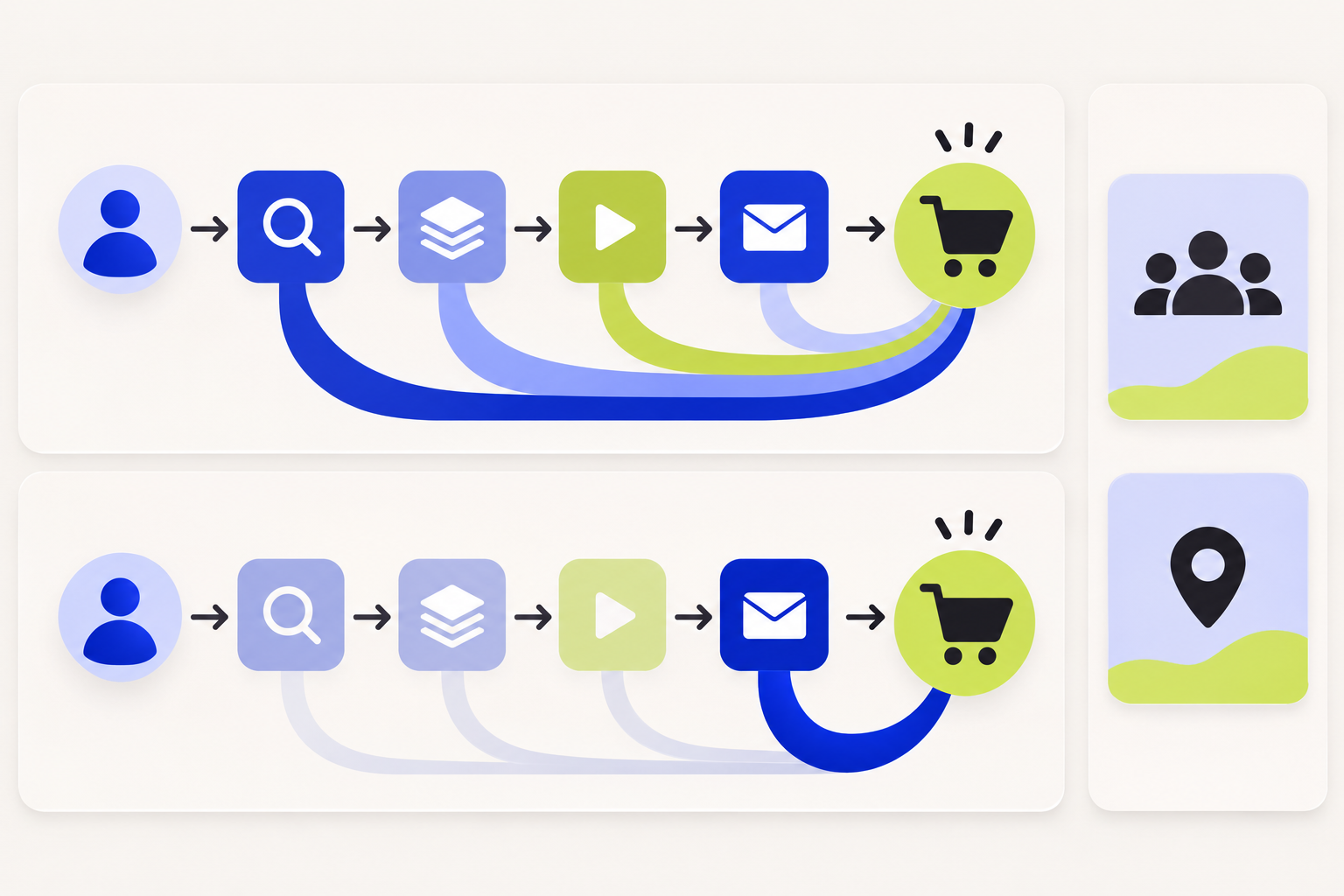
GA4’s data-driven and last-click attribution models can assign different channel credit to the same key event. A model change can alter event-scoped source, medium, campaign, and channel-group reporting, including historical data. It does not change user-scoped or session-scoped traffic dimensions such as First user source or Session source. Knowing which scope you are viewing prevents a model comparison from turning into a comparison of different metrics.

Quick guide: use GA4’s Attribution models report to compare the same key event and channel dimension under different models. Keep the key-event lookback window and eligible channels fixed while comparing. Then separate event-scoped attribution results from first-user or session-acquisition reports, which answer different questions.
What the GA4 models assign credit to
An attribution model defines how credit for a key event is assigned to the marketing interactions in a user’s path. GA4 currently offers Data-driven attribution for paid and organic channels, Paid and organic last click, and Google paid channels last click. These models answer different reporting questions; none should be read as proof that a channel caused the outcome.
| GA4 model | How it assigns credit | What to keep in mind |
|---|---|---|
| Data-driven | Uses property data for the key event to distribute credit across contributing interactions. | One event may show fractional credit across several channels; the model is specific to the key event. |
| Paid and organic last click | Assigns credit to the last eligible non-direct interaction before the key event. | Earlier interactions receive no credit in this model; an all-direct path is credited to Direct. |
| Google paid channels last click | Assigns credit to the last eligible Google Ads interaction; if the path has no Google Ads click, it falls back to Paid and organic last click. | This is a Google Ads-focused reporting view, not a neutral comparison across every channel. |
Google describes Data-driven attribution as a model that evaluates converting and non-converting paths and uses the property’s data to estimate how interactions contribute to a key event. Because credit can be split, event and revenue metrics may appear as decimals instead of whole numbers. Paid and organic last click ignores direct visits when another eligible interaction exists; if the entire path is direct, Direct can receive the credit. The current details are in Google’s Get started with attribution guide.
Example: why three reports can credit three channels
Consider a path with Organic Search, a Google Ads click, an Email visit, and then a key event. Data-driven attribution can distribute fractional credit across contributing interactions. Paid and organic last click assigns the full credit to Email, the last eligible non-direct interaction. Google paid channels last click can credit the Google Ads interaction because it is the last Google Ads click in the path. The journey is the same; the model’s rule changes the channel allocation.
A direct visit at the end does not automatically take credit from the earlier eligible touch under the last-click models. If every touch in a path is direct, Google documents that Direct can receive the credit. Keep that edge case in mind when reading Direct rows.
Which GA4 reports change when you switch models
The GA4 reporting attribution model applies to key-event reports and explorations that use event-scoped traffic-source dimensions, such as Source, Medium, Campaign, and Default channel group. Google says changing this setting affects both historical and future data. A channel’s reported key events or revenue can therefore be reassigned when the model changes; it does not mean the underlying user journey or CRM record was rewritten.
User-scoped and session-scoped traffic-source dimensions are not changed by the reporting attribution model. First user source describes how the user was first acquired; Session source describes the source for a session. If you compare those dimensions with an event-scoped Source or Campaign field, you are looking at different scopes. Our guide to GA4 First User Source vs. Session Source explains that distinction.
To change the reporting model, Google’s current instructions place the setting in Admin under Data display and Key events attribution. Access depends on the user’s property permissions. Before changing it, note the current model and take a comparable baseline from the Attribution models report. See Change the reporting attribution model for key events.
Compare models without changing several settings at once
- Choose one key event and one event-scoped dimension, such as Default channel group or Source / medium.
- Open Advertising → Attribution → Attribution models and select the models to compare. Keep the date range, key event, dimension, and filters identical.
- Review how credit moves by channel. Under Data-driven attribution, expect fractional credit where several interactions contribute; under last click, expect credit to concentrate on the final eligible interaction.
- Check the key-event lookback window and the channels that can receive credit. Keep them fixed during the model comparison because changing either alters the set of eligible interactions.
- Check the date range against the model’s available start date. GA4 reports partial data for periods before a model was introduced.
- Export or record the comparison and the model setting. Do not combine numbers from different models in one trend without annotating the change.
The Key event attribution models report is designed to compare how different attribution models affect key-event metrics and channel valuation. Google notes that attribution data can continue updating for up to 12 days after a key event as processing and model training continue. For a steadier comparison, avoid treating the most recent few days as final.
Why GA4 and Google Ads can still differ
A GA4 model comparison is not automatically a reconciliation with Google Ads. The products may be using different attribution settings, conversion actions, time windows, eligible channels, and reporting dates. Google’s paid-channels last-click view is specifically focused on Google Ads clicks, while paid and organic last click considers the last eligible interaction across those channels.
Compare matching conversion definitions and a stable date range before drawing conclusions. If the two platforms still disagree, inspect the key event’s Google Ads sharing setup, consent and identifier coverage, and the selected conversion action. Keep platform-assigned credit separate from CRM-qualified outcomes until the event definitions and time bases have been reconciled.
How to interpret a model change in a B2B funnel
In a longer B2B buying cycle, one person may discover the business through search, return through email, and later convert after a sales conversation. GA4 only attributes the interactions it can observe and connect under the selected settings. A model can redistribute reported credit, but it cannot recover an untracked conversation or prove that one touch caused an opportunity.
Use model comparisons to understand how a reporting rule changes channel valuation. Use CRM stages and opportunity history to understand what happened after the inquiry. When the business decision requires evidence of incremental impact, an experiment or another appropriate causal design addresses a different question. See our overview of marketing attribution models and their limitations and incrementality versus attribution.
GA4 attribution comparison checklist
- The same key event, date range, filters, and event-scoped dimension are selected for each model.
- The attribution lookback window and eligible channels are held constant.
- Fractional credit is treated as allocated reporting credit, not as a count of physical leads.
- First-user and session-scoped dimensions are not confused with event-scoped attribution.
- The date range does not extend into a period where the selected model has partial data.
- Recent dates are allowed to mature before the comparison is presented as final.
- Attributed channel credit is kept distinct from CRM qualification, opportunity creation, and causal lift.
If GA4 and CRM show different dates or outcomes, see Reconcile GA4 and CRM Conversions When Dates Do Not Match before changing attribution settings.
Sources and scope
- Google Analytics Help: Get started with attribution — current GA4 models and how credit is assigned.
- Google Analytics Help: Change the reporting attribution model for key events — model settings, affected dimensions, and historical/future impact.
- Google Analytics Help: Key event attribution models report — comparing model effects in GA4.
- Google Analytics Help: About modeled key events — modeling and attribution processing context.
GA4 interface labels, available models, property permissions, and attribution settings can vary over time. Confirm the current property setting before comparing exported results.
How did this article land?
Choose one reaction. You can change it anytime.