

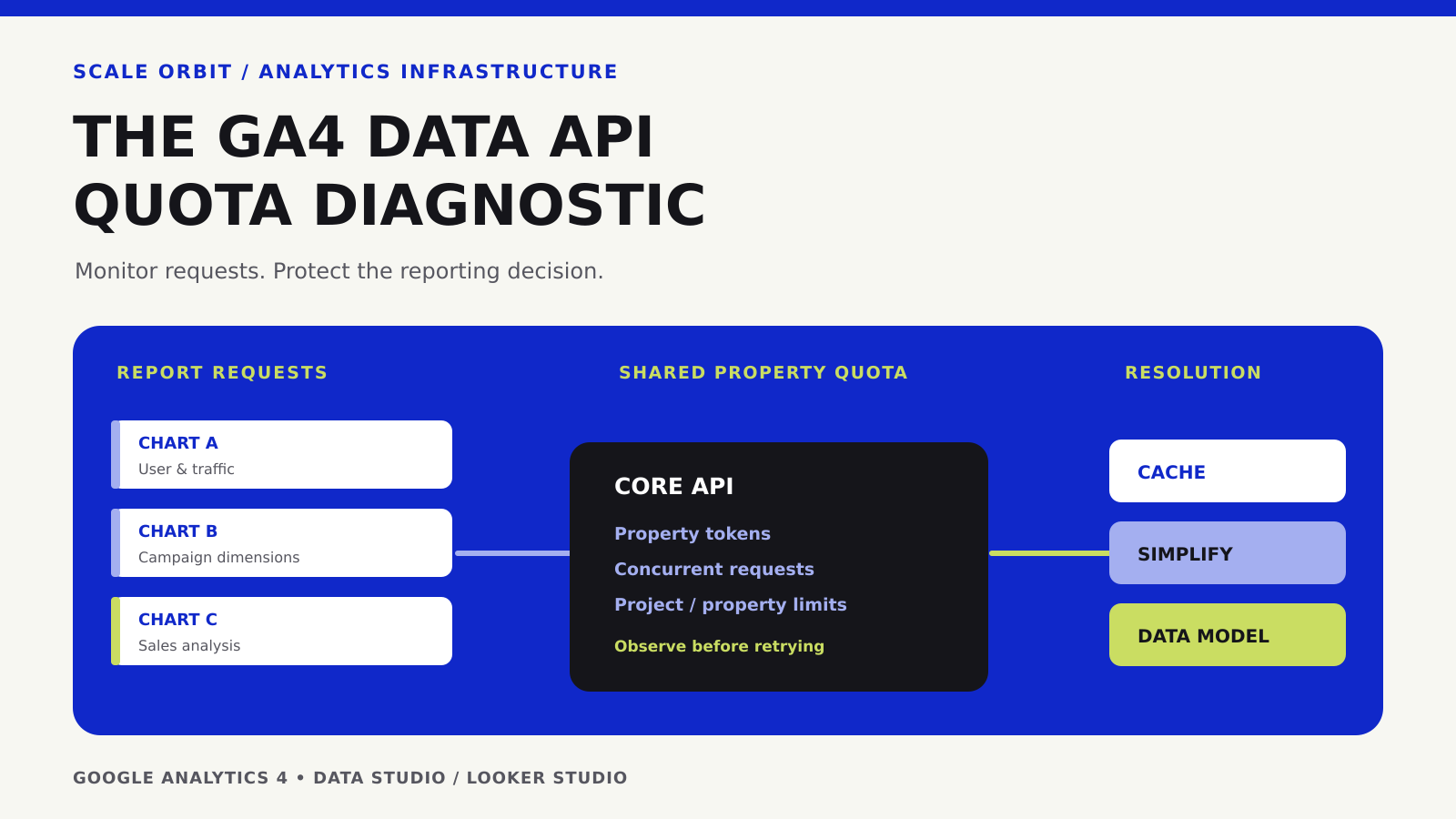
If a Looker Studio report connected to Google Analytics 4 stops loading with a quota error, do not start by reconnecting the source or repeatedly refreshing the page. First identify which limit was reached. GA4 Data API quotas are shared constraints on requests to a property and, in some cases, to the calling Google Cloud project. A report with many simultaneous charts can therefore fail even when no analytics data has been lost.
This guide is for marketing analysts, RevOps teams, and dashboard owners who need a practical way to diagnose a quota failure, preserve trustworthy reporting, and avoid rebuilding the entire dashboard unnecessarily. It addresses GA4 Data API quota errors, not every kind of connector failure.
Understand what a GA4 quota error actually means
The Google Analytics Data API quota documentation defines separate request categories, including Core, Realtime, and Funnel. Standard reports using methods such as runReport consume Core quota. The API evaluates several constraints: tokens for a property over time, tokens per project and property, concurrent requests, and server-error limits. The first exhausted applicable limit can block subsequent requests.
This is different from losing access to the GA4 property, choosing an incompatible metric/dimension combination, or displaying a sampled or thresholded result. Those issues may produce other messages. Treat the exact error text as evidence, not as a generic sign that the website tracking code needs to be reinstalled.

Recognize the three most useful error families
| What the report tells you | What to investigate | First safe response |
|---|---|---|
| Hourly or daily quota exhausted | Remaining property or project/property token balance | Reduce unnecessary GA4 queries and monitor when the quota refreshes. |
| Concurrent requests exhausted | How many charts or users are querying the same GA4 property at once | Reduce concurrent chart loads; stagger work and review live refresh behavior. |
| Access, unsupported fields, or other errors | Credentials, data source fields, connector configuration, underlying service status | Follow the exact message and verify permissions or schema; do not assume a token limit. |
Google’s Data Studio troubleshooting guide documents messages such as exhausted concurrent requests, too many requests in an hour or day, too many project/property requests, and server-error limits. It also explains how to inspect token usage from the report itself. Some errors are about authorization and should be investigated separately.
Read the report’s GA4 token usage before changing anything
- Open the report in edit mode. Right-click the report canvas and select the Google Analytics token usage option. This shows report-level usage and remaining quota where available.
- Inspect the expensive chart. Right-click a specific chart and open its Google Analytics token usage details. Identify charts issuing new GA4 requests rather than loading from memory cache.
- Record the error and time. Capture the GA4 property, report page, chart, selected dates, filters, and whether the request failed because of tokens, concurrency, server errors, or access.
- Compare source changes. Review newly added scorecards, high-cardinality dimensions, larger date ranges, and report traffic before deciding whether any one chart caused the issue.
- Stop uncontrolled retries. Repeatedly reloading many live charts can make diagnosis harder and may increase request volume once the limit allows traffic again.
In a dashboard shared with multiple teams, the source of load is not necessarily the editor who sees the error. Other dashboards and API clients can access the same property. Establish an owner for the shared analytics property before changing settings that affect many consumers.
Know the documented Core limits—and why they are not a token-per-chart allowance
As checked on November 1, 2026, Google documents the following Core limits for a standard GA4 property: 200,000 property tokens per day, 40,000 property tokens per hour, 14,000 project/property tokens per hour, and 10 concurrent property requests. Analytics 360 has higher listed limits. These are service quotas, not a promise that a specific report can load a fixed number of times. The limits can change; consult the live Google quota table before relying on a number in operational planning.
A request does not always cost the same number of tokens. Google states that a query’s cost depends on details including the requested row count, dimensions and metrics, filter complexity, date-range length, data cardinality, and property event volume. Two visually similar charts can therefore have very different costs. An average-cost estimate is useful for planning but should not replace observed usage.
Instrument requests when you control the API client
For a custom GA4 Data API integration, use the returnPropertyQuota option in supported report requests to obtain quota status in the response. This is distinct from the token-usage view available inside Data Studio. The following request body is an illustrative example, not an authenticated request to any customer property.
{
  "dateRanges": [
    { "startDate": "7daysAgo", "endDate": "yesterday" }
  ],
  "dimensions": [{ "name": "date" }],
  "metrics": [{ "name": "sessions" }],
  "returnPropertyQuota": true
}
A successful response may include a propertyQuota object reporting consumed and remaining tokens, concurrency, and related quota statuses. Inspect the actual values rather than inventing a cost from the request size. Google’s current documentation also describes API methods to inspect quota status. Developers should handle 429 RESOURCE_EXHAUSTED with bounded retries and backoff, not infinite polling.
Optimize in this order: simplify, reuse, then remodel
1. Remove queries that do not support a decision
Start with report pages and charts that are not used. Reduce duplicate scorecards, unnecessarily broad date ranges, and dimensions that create a large number of distinct rows—for example high-cardinality URLs or combinations of several detailed user attributes. Keep each chart focused on the question it answers. If a calculation can be performed once in a governed dataset rather than repeated in many expensive charts, consider that alternative.
2. Improve caching without confusing freshness with correctness
Google recommends consolidating duplicate GA4 sources into a reusable source and, where the access model permits it, considering owner’s credentials to help viewers share cached results. Owner’s credentials can affect who is able to see underlying data through the report; a dashboard owner must check access and governance before making that change. Do not switch credentials merely to avoid a warning.
The official data freshness guide explains why caching can reduce repeated queries. The configured threshold controls when a connector is eligible for refresh; it does not guarantee that the business data in GA4 or the CRM is finalized. Choose an acceptable refresh cadence for the decision, disclose it, and test after changing the setting.
3. Separate frequent operating views from expensive exploration
An executive dashboard that refreshes repeatedly should not use the same query shape as an analyst’s occasional deep-dive. Aggregate common reporting dimensions—such as day and channel—in a governed dataset when that fits the required grain. Preserve a separate route for diagnostic exploration. Do not use the term “real time” for an extract refreshed on a schedule.
4. Consider an extracted source or BigQuery when justified
Google describes extracted data sources as static snapshots that can reduce repeated requests to the underlying source. These improve load behavior but must be refreshed appropriately and may hide late updates until the next extraction. For more durable reporting, GA4’s BigQuery export can provide another data path. BigQuery incurs its own storage and query considerations; exported event data and modeled interface metrics do not always have identical semantics. Rebuild metric definitions, identity handling, and data QA before using that dataset as a substitute for the GA4 connector.
Scale Orbit’s marketing data warehouse guide explains how to model a durable data layer, while Looker Studio blending guidance warns against joining tables at incompatible grains.
A practical triage policy for teams that publish board dashboards
| Situation | Dashboard decision | Owner |
|---|---|---|
| A one-off report hits a quota during exploratory analysis | Reduce complexity and schedule the deep dive; preserve the core executive view | Analyst |
| Repeated report-viewer traffic exhausts hourly quota | Review duplicate sources, chart counts, cache settings, credential governance, and report access | Dashboard owner + analytics admin |
| Critical operating reports consistently exceed capacity | Design a governed extract or aggregate, document latency and cost, and test reconciliation | Data engineering + RevOps |
| Authorization or incompatible-field error | Resolve permissions or field definitions before changing API load | Source owner |
Keep a small incident log: report name, time, GA4 property, error category, charts involved, mitigation, remaining risk, and verification date. After applying a fix, confirm that the expected charts render, that their metrics still reconcile to the right source, and that reducing query volume has not removed a necessary business dimension.
What not to do when the dashboard is under pressure
- Do not claim that a GA4 tag is broken solely because Data Studio cannot query the property.
- Do not copy sensitive marketing or user data into an unreviewed cache or third-party connector.
- Do not collapse event count, sessions, and sales-qualified opportunities into one metric for the sake of a cheaper report.
- Do not take a short-lived
429as evidence that a costly new warehouse must be deployed immediately. - Do not ignore whether changing credentials grants a wider audience access to analytics data.
Frequently asked questions
Does a 429 mean my analytics data has been deleted?
No. It means the API rejected a request, often because an applicable quota was exhausted. Investigate data collection or retention separately if the source itself shows a missing dataset.
Will shortening a date range always solve the problem?
No. It can reduce some request costs, but a concurrency limit or another project’s load may still cause failure. Inspect the reported quota category before choosing a remedy.
Can I just wait for the quota to reset?
A token quota may reset according to Google’s published windows, but waiting treats the symptom rather than the repeated load. Identify the query pattern and cache behavior before the next executive reporting cycle.
Should a B2B team move every GA4 dashboard to BigQuery?
Not necessarily. For a small, stable report, the native GA4 connector may be adequate. A warehouse is justified when analytical grain, history, governance, cross-system joins, reliability, or usage requirements make the additional engineering cost worthwhile.
Bottom line: reliable marketing analytics depends on making the request cost and measurement semantics visible. Diagnose the exact API error, fix the highest-cost and most repeated queries first, and move to a stronger data layer only when its value and operating cost are clear.
Source check: November 1, 2026. Primary references: Google’s Data API limits and quotas, Data Studio troubleshooting, data freshness, and report performance guidance. Any operational recommendations beyond these product rules are Scale Orbit’s analytical framework, not Google guarantees.
How did this article land?
Choose one reaction. You can change it anytime.